
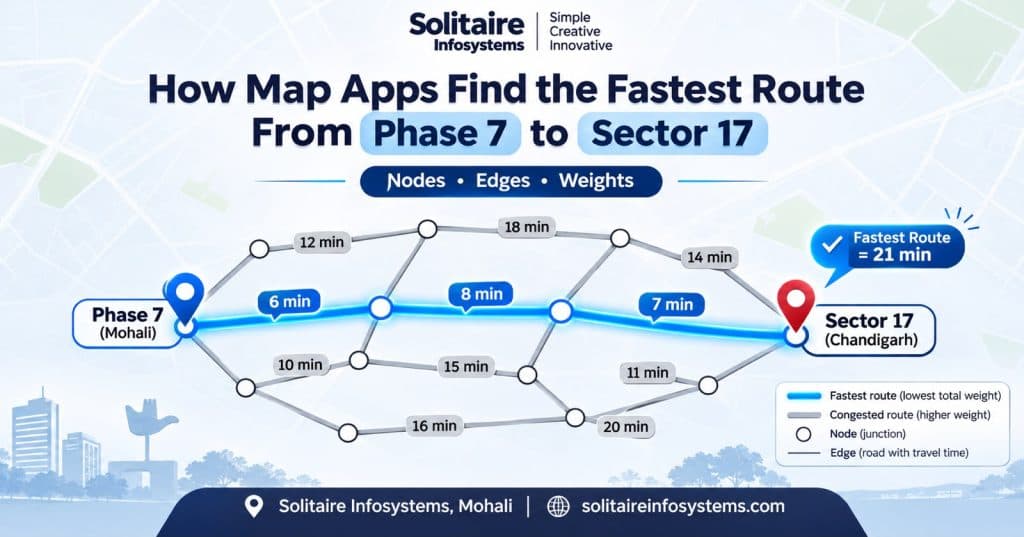
How Map Apps Find the Fastest Route
Map apps find the fastest route by turning the road network into a graph: junctions become nodes, the roads between them become edges, and each edge gets a cost based on distance and current traffic. A shortest-path algorithm, from the same family as Dijkstra’s algorithm and A*, then picks the path with the lowest total travel time. The whole search usually finishes before you’ve put your phone in its holder.
Our office is in Phase 7, Mohali, so the evening drive to Sector 17 in Chandigarh is one we know well. It’s also a good way to see how map apps find the fastest route, because the shortest road on paper is often not the quickest one at 6 pm.
What is a graph in a map app?
In computer science, a graph isn’t a bar chart. It’s a network of points and the connections between them. A map app stores roads like this:
| Graph term | What it means on a map | Example on the Phase 7 to Sector 17 drive |
| Node (vertex) | A point where a decision happens | A junction, roundabout or traffic light |
| Edge | The road segment between two nodes | The stretch between two light points |
| Weight | The cost of using that edge | Expected minutes, based on length, speed limit and live traffic |
The app doesn’t see buildings or cars. It sees thousands of nodes and edges, each edge carrying a number. Finding a route means finding the chain of edges from your node to the destination node with the smallest total.
Why is the shortest route not always the fastest?
Because the weight usually measures time, not just distance. A 3 km road through a jammed junction can cost more minutes than a 5 km road that keeps moving. When traffic builds up on a segment, its weight goes up, and the algorithm starts to treat that road as “longer” even though its length hasn’t changed. That’s also why your app sometimes reroutes you mid-drive: the weights changed, so the answer changed.
How do map apps find the fastest route, step by step?
Here is the core logic, using Dijkstra’s algorithm as the base:
- Start at your node. Your position in Phase 7 has a cost of 0. Every other node starts at “unknown”.
- Look at the roads leading out. For each neighbouring junction, cost = cost so far + weight of that road.
- Always expand the cheapest point next. The algorithm keeps a priority queue and picks the junction with the lowest total cost that it hasn’t finalised yet.
- Update if a cheaper path appears. If a new path reaches a junction in fewer minutes than the one recorded, the record is replaced.
- Stop when the destination is finalised. Once Sector 17 is the cheapest unfinished point, its cost is guaranteed to be the lowest possible, and the app traces the path back to draw the route.
Here is the same idea in about 20 lines of Python. The travel times are made up for illustration:
import heapq
# Travel time in minutes (made-up numbers for illustration)
roads = {
“Phase 7”: {“Junction A”: 6, “Junction B”: 4},
“Junction A”: {“Sector 17”: 9},
“Junction B”: {“Junction A”: 1, “Junction C”: 8},
“Junction C”: {“Sector 17”: 3},
“Sector 17”: {},
}
def fastest_route(graph, start, goal):
queue = [(0, start, [start])] # (minutes so far, place, path)
settled = set()
while queue:
minutes, place, path = heapq.heappop(queue)
if place == goal:
return minutes, path
if place in settled:
continue
settled.add(place)
for nxt, cost in graph[place].items():
if nxt not in settled:
heapq.heappush(queue, (minutes + cost, nxt, path + [nxt]))
return None
print(fastest_route(roads, “Phase 7”, “Sector 17”))
# (14, [‘Phase 7’, ‘Junction B’, ‘Junction A’, ‘Sector 17’])
Notice the result. Going straight through Junction A takes 15 minutes, but the route that detours through Junction B first takes 14. More turns, less time. That’s exactly what happens when your app sends you down a road you wouldn’t have picked yourself.
Dijkstra’s algorithm vs A*: what’s the difference?
| Dijkstra’s algorithm | A* search | |
| How it searches | Spreads out evenly in all directions from the start | Leans toward the destination using an estimate of remaining distance |
| Extra input needed | Only edge weights | Edge weights plus a heuristic, such as straight-line distance |
| Speed on a city map | Correct, but checks many points behind you | Usually checks far fewer points |
| Guarantees the best route? | Yes, if no weight is negative | Yes, if the estimate never overstates the real remaining cost |
For the Phase 7 to Sector 17 drive, Dijkstra would happily explore junctions toward Kharar and Zirakpur before reaching Chandigarh. A* knows Sector 17 lies roughly north-east and spends most of its effort in that direction.
Do real map apps just run Dijkstra on the whole map?
No. A national road network has millions of nodes, so production routing engines add two things on top of the basic search:
- Engines precompute shortcuts across the network ahead of time (techniques such as contraction hierarchies are common in open-source routing engines), so a live query only has to search a small part of the graph.
- Traffic prediction. Live speeds alone aren’t enough, because traffic 20 minutes from now matters more than traffic right now. Google and DeepMind have described using graph neural networks to predict travel times in Google Maps, which feeds better weights into the route search.
Google doesn’t publish its complete routing system, but the foundation is the same weighted-graph idea explained above.
Where do beginners usually go wrong with graph algorithms?
When students code shortest-path problems for the first time, the same mistakes show up again and again:
- Using breadth-first search on weighted roads. BFS finds the path with the fewest edges, not the fewest minutes.
- Skipping the priority queue. Scanning a plain list for the smallest cost works on five nodes and crawls on five thousand.
- Forgetting the “settled” check. Without it, the same junction gets processed repeatedly.
- Using Dijkstra with negative weights. It can return a wrong answer; Bellman-Ford is the right tool there.
- Choosing an adjacency matrix for a road map. Roads are sparse, so an adjacency list (like the dictionary above) saves a lot of memory.
FAQ
What algorithm does Google Maps use to find the fastest route?
Google does not publish its full routing system. The core idea behind route planning is shortest-path search on a weighted road graph, the family that includes Dijkstra’s algorithm and A*, combined with preprocessing that speeds up searches on huge maps. Google and DeepMind have also published work on using graph neural networks to predict travel times.
What is the difference between Dijkstra’s algorithm and A*?
Dijkstra’s algorithm expands outward from the start in every direction, always taking the cheapest unexplored point next. A* does the same but adds an estimate of the remaining distance to the destination, so it searches mostly in the right direction and usually checks far fewer points.
Why does my map app change the route while I am driving?
Live traffic changes the cost of road segments. When a road on your route gets slower, its weight goes up, the app recalculates, and if another path now has a lower total travel time it suggests that route instead.
Is it difficult to learn graph algorithms as a beginner?
Not if you learn them in order. Start with what nodes and edges are, then breadth-first and depth-first search, then Dijkstra’s algorithm with a priority queue. Coding small examples, like a few junctions with travel times, makes the logic much easier to follow than reading theory alone.
Why does this matter if you want a career in software?
Graphs aren’t just for maps. Food delivery apps assign riders with them, networks route data packets with them, and social platforms use them to suggest connections. They also come up often in technical interviews, because they show whether you can turn a messy real-world problem into a structure a program can solve.
Solitaire Infosystems is a software development and IT training company based in Phase 7, Mohali, close to the route in this article. Students and freshers who want to practise this kind of problem-solving on real work can join our 6 months industrial training in Mohali or apply for a stipend-based internship on live projects. Batches for January 2027 are coming up.
Want to know which programme suits your course and skill level? Talk to our training team, call 9876656700, or email info@solitaireinfosystems.com.